For hifz schools and teachers

Every student. Every Wird.

Hifz Daily, for your whole madrasah.

Hifz Maktab is the teachers’ side of Hifz Daily. Set each class’s plan, see who has closed today’s Wird, and follow every student’s revision, memorisation and Hifzy readings, all in one place. Your students keep using Hifz Daily. You see their Wird close.

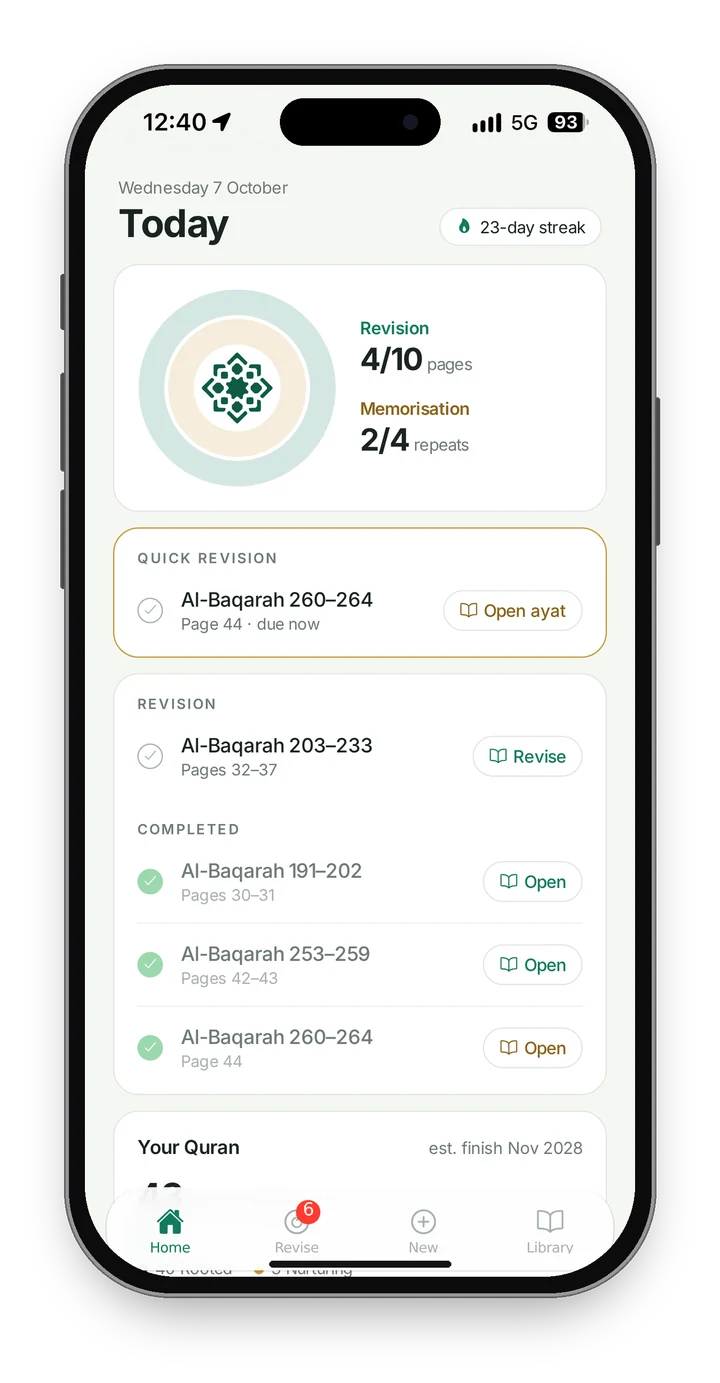
Hifz Daily’s Today screen: revision at four of ten pages and memorisation under way

Why Hifz Maktab

A hifz class runs on the teacher’s memory. Who revised last night, who is falling behind, whose Rooted pages are getting rusty. Notebooks and spreadsheets only go so far, and the more your students memorise, the more there is to keep track of.

Hifz Daily already plans each student’s Wird. Hifz Maktab puts every one of those plans in front of their teacher. These are a teacher’s questions, and this is how it answers them.

Who has done their revision today?
Open your class. Each student’s two rings show how much of today’s Wird they’ve closed, and one tap shows only those still to close.
Is everyone on the plan I set?
Yes. You set one plan for the class, and a plan of their own for any student who needs it. Students can’t change a plan their teacher has set.
Which pages need more care?
Every student’s Rooted and Nurturing pages are there, along with today’s revision and what they’ve ticked off.
Did they really recite it from memory?
When a student recites to Hifzy, you see the score and every word Hifzy flagged.
Who’s keeping it up?
Every student’s streak and their last two weeks of Wird, at a glance. And a leaderboard, for a little friendly competition.

How Hifz Maktab works

Set it up once. From then on, every student gets their Wird from your plan, every day.

1

Set up your madrasah

Your Maktab admin adds your classes and teachers and sets your term dates. Each class gets its own join code.

2

Bring your students in

Students already on Hifz Daily tap Join a Madrasah in My Hifz and enter your class code. New students get an email invite, and their Hifz Daily is set up as part of your class. Either way, they skip the waiting list.

3

Set the plan

Choose the track, the pace, the memorisation days and the daily revision load for the whole class. Any student who needs something different can have a plan of their own.

A change starts straight away. If a student has already started today’s Wird, it starts tomorrow, so their day is never changed halfway through.

4

Follow along

Every day, Hifz Daily sets each student’s Wird from your plan, revision first, then new memorisation. You see whose Wird is closed, their streak, their progress and their Hifzy readings.

Everything a hifz teacher needs

Your classes, your students and their Wird, ready when you open Hifz Maktab on your phone, iPad or computer. Check in before class, between lessons, or after Isha.

Every student, page by page

Tap a name to see today’s Wird, what they’ve revised, their last two weeks, and how much they’ve memorised, both in Hifz Daily and before it. Rooted and Nurturing pages are counted separately, so you know where to spend your time in class.

Hifzy, a camel in a cap and round glassesBeta

What Hifzy heard

When a student recites to Hifzy, the reading comes to you: the score, and each word Hifzy flagged, missed or misread.

A little friendly competition

Streaks, Wird closed and ayat memorised this term, ranked for the class and across the whole madrasah. Students see the same board in Hifz Daily.

Every class, in one place

See how each class is doing today, search for any student across every class you teach, and approve requests to leave. Your Maktab admin looks after teachers, classes and term dates.

Between lessons

Hifz doesn’t stop at the classroom door.

Class time is short. Most hifz happens at home: after Fajr, on the way to school, before bed. Hifz Daily gives every student a plan for each day and a reason to keep showing up, so they come to you ready.

Beta

Hifzy before tasmi’

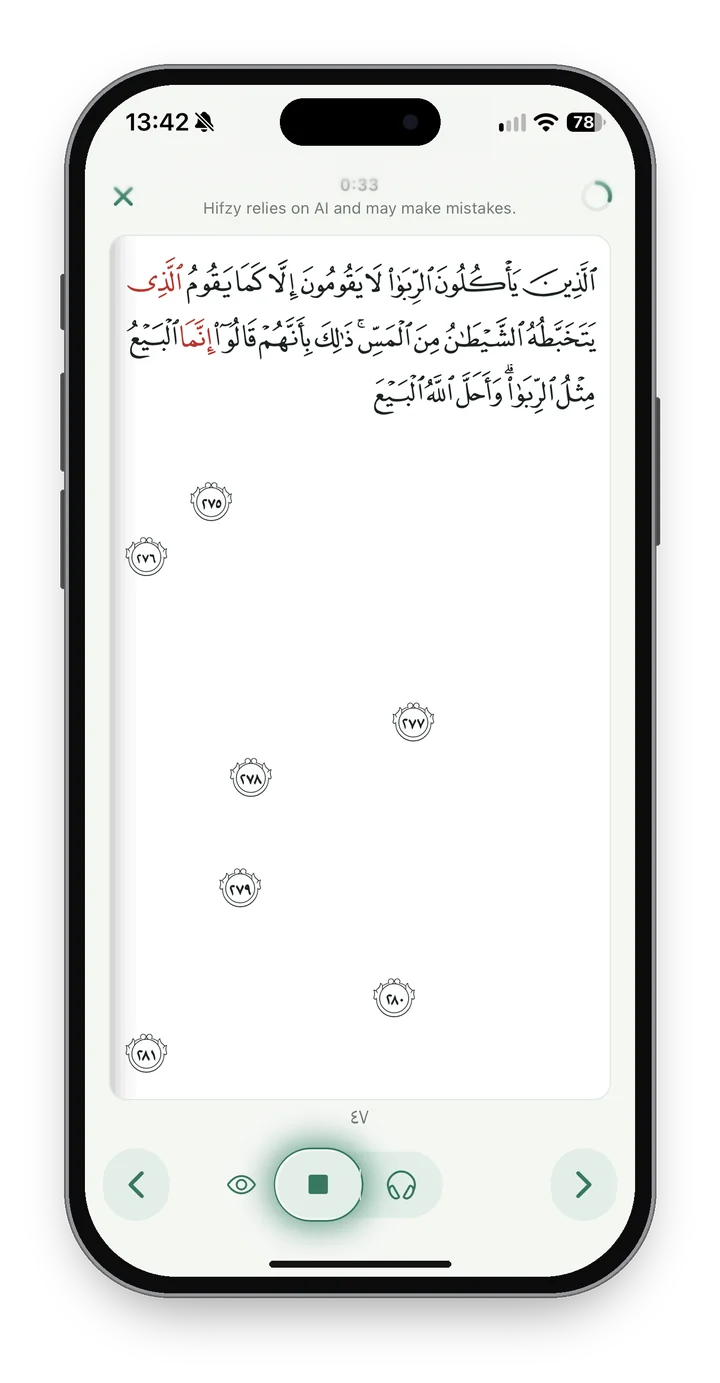
Before they come to you for tasmi’, students recite to Hifzy. The page blanks out, each word appears as they say it, and any mistakes show up in red. They find their slips at home and fix them, so your time together goes on the recitation itself.

Every reading comes through to you in Hifz Maktab, with the score and the words Hifzy flagged.

Reciting to Hifzy: the page is blank, the recited words appear, and mistakes are marked in red

A Wird to close every day

Every day, Hifz Daily sets each student’s Wird from your plan: revision first, then new memorisation. Two rings to close, a streak to keep, and a calendar of every Wird they’ve closed.

34-day streak

Watering through the day

After memorising, students get gentle reminders to come back for a two-minute read-over, spaced out until bedtime. A minute here and there helps new ayat stick.

Listen as they memorise

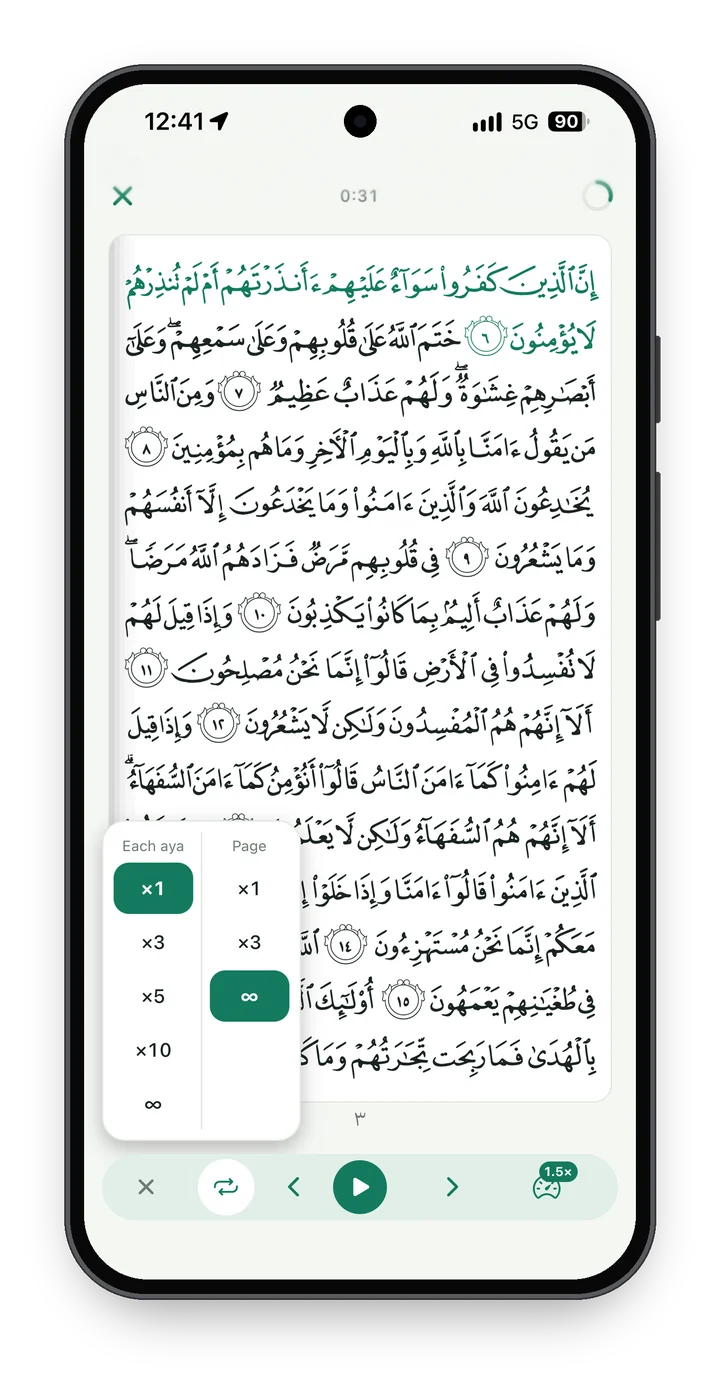
Whether you teach madd al-munfasil or qasr al-munfasil, it’s covered. Students repeat an aya, loop their portion and slow it down, so they hear it right at home.

An aya highlighted as it’s recited, with the audio controls and options to repeat each aya or the page
Hifz Maktab keeps the plan. You still hear the recitation.

Nothing replaces sitting with your students and hearing them recite. Hifz Maktab takes care of the keeping track, so more of your class time goes on the Quran.

Bring Hifz Maktab to your madrasah

Hifz Maktab is in beta, and we’re setting it up with a small number of hifz schools and classes. Tell us about yours and I’ll be in touch.

Your role
How many students memorise with you?

Questions, answered

What is Hifz Maktab?

The teachers’ side of Hifz Daily. Students memorise and revise in Hifz Daily as usual; teachers and Maktab admins use Hifz Maktab to set their plans and follow their progress.

Do my students need Hifz Daily?

Yes. Each student uses Hifz Daily on their own phone, iPad or computer, signed in with their own account. Students who join through your class skip the waiting list.

How do students join a class?

Students already on Hifz Daily tap Join a Madrasah in My Hifz and enter your class code. New students get an email invite from you, and their Hifz Daily is set up as part of the class.

Can students change their own plan?

Not one their teacher has set. They can see it in Hifz Daily, and you can change it any time.

What do teachers see?

Each student’s Wird for today, their streak, their last two weeks, their Rooted and Nurturing pages, today’s revision list, and their Hifzy readings.

What if a student wants to leave a class?

They ask from Hifz Daily, and a teacher or the Maktab admin approves the request. They keep their plan as it is, and everything they’ve memorised stays with them.

Does it suit our way of teaching?

Classes can follow the full Quran, chosen juz or chosen surahs, from the end or in mushaf order, and revise by passage or by page. Choose the pace, the memorisation days and the revision load to match how you teach.

Which devices does it work on?

Any phone, iPad or computer. It runs in the browser; add it to your Home Screen and it opens like an app. Sign in with your Hifz Daily account.

Teach the hifz. We’ll keep the plan.

Register your madrasah and I’ll be in touch.

Register your madrasah